All's Well that Sells Well: A Creative Introduction to Shakespeare

- Preview |
- Standards |
- Resources & Preparation |
- Instructional Plan |
- Related Resources |
- Comments
Overview
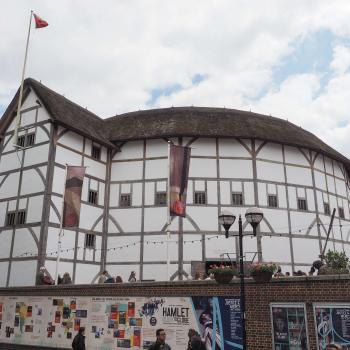
After taking a virtual tour of The Globe Theater in Elizabethan London, students use graphic organizers to compare attending a performance at The Globe to attending a current professional production (such as a play on Broadway) or to viewing a movie at a local theater. They discuss the similarities and differences in the theaters and imagine what types of products might have been advertised in Elizabethan time, if The Globe showed commercials before the play like modern movie theaters do. They then work collaboratively in small groups to create a commercial advertisement geared toward an Elizabethan audience to promote one of today's products or conveniences. This activity helps students better understand the Elizabethan times and Elizabethan theater audiences, as well as persuasive advertising techniques.
Featured Resources
ReadWriteThink Notetaker: Students can use this online tool to take notes and organize them into an outline format.
Venn Diagram: Students can use this online tool to compare any two items, including theater experiences.
Theater Comparison Instructions and Resources: This resource gives students full instructions for an activity comparing theaters in Shakespearean times with modern theaters and includes useful Websites for research.
From Theory to Practice
In Opening Texts: Using Writing to Teach Literature, Kathleen Andrasick writes that effective teaching strategies reduce "the distance between students and texts via processes of personal and active engagement," thereby helping them to "imaginatively link themselves with other authors and their writing" (130). This introductory activity helps students to create connections to Shakespeare and his audiences and to generate an "aesthetic response" to his "artistic creation" (130).
Andrasick's approach aligns with advice put forth by Delia DeCourcey, et al., in their NCTE publication, Teaching Romeo and Juliet: A Differentiated Approach, in which they stress that "[a]ll students should feel part of a community of learners...[and a variety of assignments should] address students' needs for belonging as well as personal learning styles" (1). Combining online research, persuasion, creative writing, and performance, this activity certainly provides a variety of learning opportunities essential for engaging a wide variety of learners in an exploration of a play by Shakespeare.
Further Reading
Common Core Standards
This resource has been aligned to the Common Core State Standards for states in which they have been adopted. If a state does not appear in the drop-down, CCSS alignments are forthcoming.
State Standards
This lesson has been aligned to standards in the following states. If a state does not appear in the drop-down, standard alignments are not currently available for that state.
NCTE/IRA National Standards for the English Language Arts
- 1. Students read a wide range of print and nonprint texts to build an understanding of texts, of themselves, and of the cultures of the United States and the world; to acquire new information; to respond to the needs and demands of society and the workplace; and for personal fulfillment. Among these texts are fiction and nonfiction, classic and contemporary works.
- 2. Students read a wide range of literature from many periods in many genres to build an understanding of the many dimensions (e.g., philosophical, ethical, aesthetic) of human experience.
- 3. Students apply a wide range of strategies to comprehend, interpret, evaluate, and appreciate texts. They draw on their prior experience, their interactions with other readers and writers, their knowledge of word meaning and of other texts, their word identification strategies, and their understanding of textual features (e.g., sound-letter correspondence, sentence structure, context, graphics).
- 4. Students adjust their use of spoken, written, and visual language (e.g., conventions, style, vocabulary) to communicate effectively with a variety of audiences and for different purposes.
- 5. Students employ a wide range of strategies as they write and use different writing process elements appropriately to communicate with different audiences for a variety of purposes.
- 7. Students conduct research on issues and interests by generating ideas and questions, and by posing problems. They gather, evaluate, and synthesize data from a variety of sources (e.g., print and nonprint texts, artifacts, people) to communicate their discoveries in ways that suit their purpose and audience.
- 8. Students use a variety of technological and information resources (e.g., libraries, databases, computer networks, video) to gather and synthesize information and to create and communicate knowledge.
- 11. Students participate as knowledgeable, reflective, creative, and critical members of a variety of literacy communities.
- 12. Students use spoken, written, and visual language to accomplish their own purposes (e.g., for learning, enjoyment, persuasion, and the exchange of information).
Materials and Technology
Printouts
Websites
Preparation
- Review the background information for Elizabethan England, The Globe Theater, and Broadway performances by familiarizing yourself with the links provided in the Theater Comparison Instructions and Resources or others to which you may provide student access. Note that the Broadway and Fandango sites do have advertisements and ticket sales.
- Preview the Virtual tour from the Shakespeare's Globe Website and ensure that you have the appropriate software and plug-ins installed. If possible, obtain a projector to display the tour to the class. If this is not possible, bookmark the site on each computer that students will be using.
- Arrange for student access to computers and Internet in Session One and for any other additional research time.
- Prepare copies of the Commercial Presentation Planning Sheet and Commercial Presentation Rubric.
- Print one copy of the Product List for Commercials, cut it into strips, and place the strips in a box, bag, or hat for student drawings.
- Print the Theater Comparison Instructions and Resources or make it available online.
- You may wish to consult ReadWriteThink lessons Critical Media Literacy: Commercial Advertising and/or Persuading Readers with Endorsement Letters for additional background and teaching ideas related to commercials and advertisements.
- Test the Venn Diagram and ReadWriteThink Notetaker on your computers to familiarize yourself with the tools and ensure that you have the Flash plug-in installed. You can download the plug-in from the technical support page.
Student Objectives
Students will
- compare attending a performance at The Globe to seeing a Broadway production or a movie.
- research Internet sources to gain information regarding performances at The Globe and use their own experiences to relate this Elizabethan experience to viewing a contemporary movie at a local theater.
- create and perform a commercial advertisement of a modern product, presented as if the audience were people attending The Globe in the early 1600s.
Session One
- Introduce the activity by asking students if they ever have attended a live theater performance. Lead a discussion of impressions and occurrences, beginning with what performance they saw, how much the ticket cost, where they sat, how people around them behaved and responded, and whether they would recommend the performance to others and why.
- Ask similar questions about recent attendance at local movie theaters and draw out any immediate comparisons between live theater and a movie theater experience.
- Introduce the comparative activity by projecting the virtual tour from the Shakespeare's Globe Website. As you show students each of the components of the tour (Stage, Yard, Middle Gallery, and Upper Gallery), have students verbalize their observations about how attending a performance in such a venue would be similar or different from a modern theater or cinema.
- After discussing what students have observed from the virtual tour, direct students to the Theater Comparison Instructions and Resources page or distribute printed copies. Explain that students are going to research contemporary theater and movie experiences and the experiences of attending a performance at a theater in the 1600s (such as the one they just saw, based on the design and architecture of Shakespeare's original Globe), and then compare and contrast them using a graphic organizer. Review the instructions with students.
- Give students time to research the theater comparisons individually or in pairs, using the Theater Comparison Instructions and Resources handout or Web page as a guide. Students can organize the information they gather using the ReadWriteThink Notetaker.
- When students have completed their research, introduce them to the Venn Diagram and the Compare and Contrast Chart Graphic Organizer. Briefly discuss how these graphic organizers can be used to compare and contrast items.
- Depending on the level of your students, have them use one of the graphic organizers you introduced to compare the Globe Theater of Shakespeare's time with either Broadway Theater or a modern movie theater, or have them create their own organizer instead.
Session Two
- Discuss some of the similarities and differences students discovered between Shakespeare's theater and the modern theaters they compared in the previous session. Be sure each student or group of students contributes to the discussion. You may wish to record student responses on butcher paper or an overhead, or have a student volunteer do the same.
- Ask students to imagine that Shakespeare's plays were preceded by commercials (as movies are today). What kinds of products might have been advertised? What modern products might have been useful in Shakespeare's time? Why would these products have been useful?
- Assign students to collaborative groups of two or three and explain that they are going to prepare a one- to two-minute commercial for a modern product or convenience which they will present to the class as if the audience were at The Globe in the 1600s. They must present the product in such a way that the audience, who would have no idea of the concept, will not only will understand it but will desire to purchase it.
- Provide groups with a copy of the Commercial Presentation Planning Sheet and the Commercial Presentation Rubric, which will be used to assess their commercials, and inform them that they will have the rest of the session to create their commercials to be presented in the next session.
- Have a member of each group choose a product to advertise from the hat, box, or bag containing the product slips (from the Product List for Commercials you prepared earlier), or allow students to determine their own products.
- Allow time in class for the students to discuss and prepare their commercials. Monitor their progress as they work. Some students may need time outside class (or an additional session in class) to complete their commercials or to gather materials for props.
Session Three
- Provide time at the beginning of class for the groups to organize their materials and make any last-minute preparations.
- Have students present their commercials to the class. Complete a Commercial Presentation Rubric for each group as they present.
- As each group presents, have each student in the audience write a one-paragraph reflection piece for the presenters that includes the following:
- I learned from your presentation that...
- The part of your presentation that I most enjoyed is... because...
- One thing I would have changed about your presentation is...
- I learned from your presentation that...
Extensions
- Have students create an advertisement for the same product in a modern setting. Have them video and edit this advertisement and provide a brief written explanation of the differences in their choices based on audience and mode of communication (video as opposed to live performance).
- Return to students' advertisements after reading an act or two of the play the class is studying. Have them rewrite their ad copy, this time attempting to match Shakespeare's use of language. You may require students to write in blank verse, or for extra challenge, have them transform the advertisement into a sonnet that could be performed as a prologue or between scenes. See the ReadWriteThink lesson plan Discovering Traditional Sonnet Forms for background on the sonnet.
- After study of the play, have students choose an item, object, product, or service from the play to advertise to a modern audience. Students reading Romeo and Juliet could, for example advertise the Friar Laurence's special formula sleeping potion, the Apothecary's shop, Friar John's messenger service, etc.
- Have students create a product targeted toward a certain character or group of characters in the play. They could, for example, design an ad for a stress reliever for Prince Escalus or family counseling for the Montagues, either of which could be placed strategically in Act One of Romeo and Juliet.
Student Assessment / Reflections
- Score the Compare and Contrast Chart Graphic Organizers for completion.
- Use the Commercial Presentation Rubric as the major assessment component for this introductory activity.
Add new comment