Informational Sheet
PowerPoint Tool Tips
Grades
3 - 12
Printout Type
Informational Sheet
About this printout
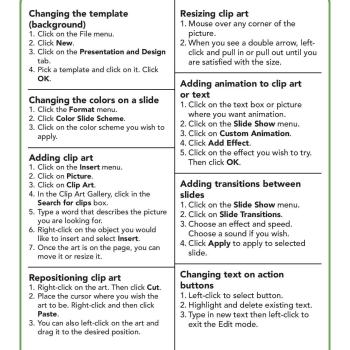
Combining words, images, graphics, and multimedia is simple with PowerPoint software. Students learn the basics of slide creation.
Teaching with this printout
Students can add visual interest and communicate powerful messages through PowerPoint.
- If students are new to PowerPoint, it's probably best to give them time to explore what the software has to offer before asking them to complete an assignment of their own.
- Ask students to experiment with the different menus, especially those within the "Design" heading.
- Remind students that PowerPoints are meant to help an audience understand the message of a presentation. They shouldn't be the outline or complete text of what the speaker intends to say.
- Have students try different slide designs, using different combinations of images, graphics, media, and text to communicate a message effectively and memorably.
More ideas to try
Once students are familiar with PowerPoint software, they can use it to:
- Plan out a story, finding images from the web that inspire ideas for characters and plot points.
- Supplement a research assignment, combining key ideas in text, charts and graphs, and images.
- Showcase their work over a semester or year. Take digital photographs of work that is important to them. Students can upload the images and write reflections on why those pieces are meaningful. Share these presentations at Open House or another event where students, friends, and families come together.